Taming Image Exclusion in a Vertical Typesetting Engine
I'm building a Japanese vertical text layout engine called mejiro. It handles line breaking, kinsoku shori, ruby annotations, and pagination in JavaScript, rendering paginated vertical text in the browser.
What is a vertical typesetting engine?
CSS writing-mode: vertical-rl gives you vertical text in the browser. But once you need page breaks, image exclusion, or variable-size headings, CSS alone falls short. mejiro computes line breaks through page layout entirely in JavaScript, then renders the results to the DOM.
I implemented image exclusion — text flowing around images, the kind you see in magazines and books. In horizontal writing, CSS shape-outside handles this. In vertical writing, it doesn't work. I had to build it from scratch.
The repository includes a demo application you can run with yarn dev. It ships with an EPUB of Natsume Soseki's I Am a Cat, which loads automatically on startup. Drag and resize image placeholders, and the text reflow updates in real time. There's just a requestAnimationFrame throttle — every image move triggers a full cycle of slot computation, line breaking, and page layout.
How Columns Work in Vertical Text
First, the spatial model.
In vertical writing, columns flow from right to left. Each column is a tall, narrow region where characters run top to bottom. The spacing between columns — linePitch — is fontSize × lineHeight.
What is linePitch?
The distance from the center of one column to the center of the next. It's the vertical-writing equivalent of "line spacing" in horizontal text, except it's a horizontal distance. With a 16px font and 1.8 lineHeight, linePitch is 28.8px.
Reading direction is right to left. Column 0 is the first column you read, at the right edge of the page. Each subsequent column moves left. When all columns have the same linePitch, column positions are simple multiplication — column index × linePitch.
Flowing Around Images
Say there's an image in the upper-right area of the page. It's about three columns wide and half the page tall.
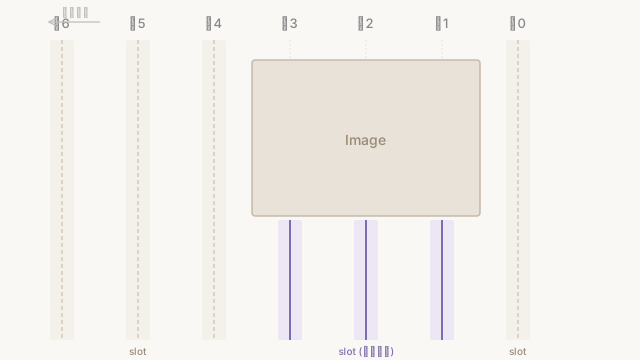
Column 0 doesn't overlap the image, so its full height is available for text. Columns 1–3 overlap the image, so only the portion below the image can hold text. Columns 4 onward are clear of the image and use their full height.
Computing "which columns overlap the image, and where are the gaps" is what the ExclusionEngine does.
Try it in the demo above. Place an image near the heading on the right page, and text wraps below it.
Slots
The ExclusionEngine computes slots — regions where text can be placed — for each column.
A column with no image has one slot: the full column height. A column that overlaps an image may have gaps above and below the image, producing two slots for a single column.
// A region where text can be placed, computed by the ExclusionEngine
interface ColumnSlot {
  xPos: number;    // horizontal offset from the right edge
  yStart: number;  // vertical offset from the top
  height: number;  // available height for text (= line length in vertical writing)
}
The engine checks each column for overlap with image rectangles, merges overlapping intervals, and returns the remaining gaps as slots.
// Collect gaps not occupied by images in this column
const gaps: ColumnSlot[] = [];
let prevEnd = 0;
for (const [top, bottom] of merged) {
  const gapH = top - prevEnd;
  if (gapH >= MIN_GAP_HEIGHT) {
    gaps.push({ xPos, yStart: prevEnd, height: gapH });
  }
  prevEnd = bottom;
}
// Add trailing gap below the last image
const tailGap = lineWidth - prevEnd;
if (tailGap >= MIN_GAP_HEIGHT) {
  gaps.push({ xPos, yStart: prevEnd, height: tailGap });
}
MIN_GAP_HEIGHT is 8px. Gaps smaller than that are discarded. No point cramming characters into a few pixels.
The engine returns an array of slots and a Float32Array of text widths for each slot. A slot's height is the text width — in vertical writing, "column height" corresponds to "line length."
Two Rendering Modes
Once slot positions are known, they need to be placed in the DOM. Here, pages with images and pages without images diverge completely.
What is tate-chu-yoko (text-combine-upright)?
A technique for laying out half-width characters horizontally within vertical text. For example, rendering "2026" in "2026年" sideways within a single character width. Achieved with the CSS text-combine-upright property.
Pages without images can simply pour text into CSS writing-mode: vertical-rl. The browser handles column placement, line spacing, paragraph gaps, ruby, and tate-chu-yoko automatically.
Pages with images can't use this. The "holes" — columns where only part of the height holds text — can't be expressed in CSS vertical-rl.
Place a large image near the center of a page, and text splits above and below it. Two slots in a single column.
Each slot's coordinates are computed in JavaScript and positioned with position: absolute.
Here's the rendering code from the demo.
function renderSlotPage(contentEl: HTMLElement, result: PageResult): void {
  // Switch parent to horizontal-tb so absolute positioning works in screen coordinates
  contentEl.style.writingMode = 'horizontal-tb';
  contentEl.style.position = 'relative';

  for (let i = 0; i < result.lines.length; i++) {
    const line = result.lines[i];
    const slot = result.slots[i];
    if (slot.height <= 0) continue;

    // Each slot is absolutely positioned; only its content is vertical-rl
    const col = document.createElement('div');
    col.className = 'exclusion-column';
    col.style.right = `${slot.xPos}px`;   // horizontal position from right edge
    col.style.top = `${slot.yStart}px`;    // vertical position from top
    col.style.height = `${slot.height}px`; // available height for text
    col.style.fontSize = `${line.fontSize}px`;

    for (const seg of line.segments) renderSegmentToDOM(col, seg);
    contentEl.appendChild(col);
  }
}
Note the container's writingMode is set to horizontal-tb. The parent is switched to horizontal, each slot <div> is absolutely positioned, and only the content inside each slot is vertical-rl. CSS auto-layout is turned off; JavaScript-computed coordinates take over.
A single page result carries data for both modes: a paragraph-structured RenderPage for normal rendering, and a flat line list with coordinate arrays for slot-based rendering.
interface PageResult {
  page: RenderPage;     // normal mode: pour into CSS vertical-rl
  lines: PageLine[];    // slot mode: flat line list
  slots: ColumnSlot[];  // slot mode: coordinates per line
  hasImages: boolean;   // which mode to use
}
When Headings Change the Pitch
Everything above assumes uniform linePitch across all columns. Variable-size headings break that assumption.
Say an h2 heading is rendered at 1.5× body size (24px). Its linePitch is 24 × 1.8 = 43.2px. Body text is 16 × 1.8 = 28.8px. A difference of 14.4px.
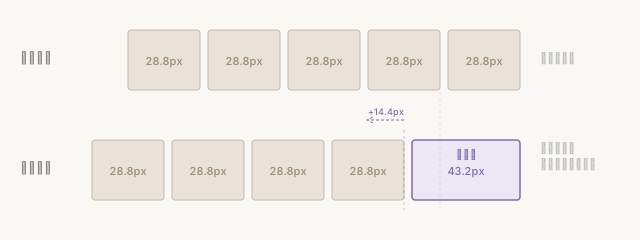
Every column after the heading shifts 14.4px to the left. Paragraph gaps add to the shift. The more columns, the more the offset accumulates. Same number of columns, different physical width.
The ExclusionEngine computes column positions using uniform pitch. On a page with headings, the engine's "column 5 is here" doesn't match where column 5 actually renders.
Compensating with Cumulative Offsets
Making the ExclusionEngine itself handle variable pitch was an option. But it would have blown up the engine's complexity. Instead, I compensate outside the engine.
buildLineMetrics() computes a cumulative offset — a Float32Array that accumulates "previous line's pitch excess + paragraph gap" for each line.
Image coordinates are adjusted by this cumulative offset before being passed to the ExclusionEngine. The engine's internals stay uniform-pitch. The outside world makes up the difference.
At this point, three coordinate systems are in play.
| Coordinate system | Direction | Purpose |
|---|---|---|
CSS left | distance from left edge | DOM placement of image overlays |
CSS right | distance from right edge | absolute positioning of columns |
| Engine internal | column index × linePitch | image-to-column overlap detection |
Image left coordinates are converted to the engine's coordinate system. The engine's results are converted back to CSS right coordinates. Each conversion flips direction.
Dropping Columns That Overflow
Cumulative offsets get the coordinates right. But push the heading too large and a different problem surfaces. As later columns pack leftward, the leftmost column's physical position crosses the left edge of the content box. Drag the slider in the figure above past 1.5×: the leftmost column turns dashed and drops out. That's this case.
Under uniform pitch the columns fit the page exactly. Add the heading's pitch excess after the fact, and the trailing column gets pushed outside the frame. After re-applying the offset, adjustExclusionSlots() cuts any trailing column whose xPos + pitch exceeds the content-box width.
const xPos = slots[i].xPos + extraOffset;
// Drop trailing columns pushed past the content box by the heading excess
if (contentWidth != null && adjusted.length > 0 &&
    xPos + metrics[li].pitch > contentWidth + 0.5) {
  break;
}
adjusted.push({ xPos, yStart: slots[i].yStart, height: slots[i].height });
At least one column always survives — dropping every column would leave the page empty and stall the line walk. The dropped column's text carries over to the next page, since the column count shrinks.
Pagination (paginate()) decides how many columns fit with floor(content width / linePitch) — uniform pitch, blind to headings. So on a page where a heading and an image share the space, this later trimming is what squares the books.
Line Breaking Runs Twice
Columns that overlap an image get shorter slots. Shorter slots mean less text fits. Less text changes where lines break. Different line breaks change the line count. Different line counts change the metrics.
What is line breaking?
The process of splitting text into lines. "Wrap where it fits within this width" sounds simple, but Japanese requires kinsoku shori (preventing punctuation at the start of a line) and accounting for ruby annotation widths. mejiro's computeBreaks() handles all of this and returns the break positions for each line.
Line breaking has to run twice.
Phase 1 (Pre-reflow): Compute metrics and cumulative offsets from the initial line breaks. Adjust image coordinates by those offsets. Pass them to the ExclusionEngine. The engine returns each slot's height (= text width).
Phase 2 (Post-reflow): Re-run line breaking using the slot heights as per-line widths. Lines next to images break at shorter widths, so the line count may change. Recompute metrics from the new line count. Determine final slot placement.
Using Phase 1 metrics to build Phase 2 placement introduces subtle drift. A single line count change shifts the cumulative offset.
Spanning a Spread
What is a spread?
Japanese books use the spread — a right page and left page as a pair — as the basic layout unit. In vertical writing, you read the right page first, then continue to the left page.
Images can go on either page.
mejiro's SpreadExclusionEngine takes image coordinates relative to the right page's top-left corner. A negative x value means the image extends into the left page.
Internally, it creates two ExclusionEngine instances — one for the right page, one for the left — distributes images with coordinate conversion, calls compute() on each, and concatenates the slots and line widths into a single contiguous result. Text flows from column 0 of the right page through the last column, then continues at column 0 of the left page.
When an image straddles the spine, it's split at the gutter into a right-page portion and a left-page portion. Each side gets its own cumulative offset compensation.
Because pages with and without images use different slot computation, there are four branching patterns per spread: right has images / left doesn't, the reverse, both, neither. Spread-based display is a basic requirement for Japanese book readers, so this branching is unavoidable.
Working with Vertical Coordinates
CSS has a vertical writing specification. writing-mode: vertical-rl flows columns right to left. The spec exists, but its combination with the concept of pages is weak. CSS Paged Media exists but browser support is limited. shape-outside for exclusion is unstable in vertical mode.
So you end up writing a typesetting engine in JavaScript. What CSS handles well — normal text rendering, ruby, tate-chu-yoko — stays with CSS. What CSS can't handle — page breaks, variable pitch, image exclusion — JavaScript takes over. The two rendering modes coexist because of this division of labor.
Vertical coordinates aren't an extension of horizontal ones. Column flow is reversed. "Line width" is rotated 90 degrees. Three coordinate systems, all in play at once. Layer variable font sizes and image exclusion on top, and assumptions you never thought about in horizontal writing start falling away, one by one.